🚀Getting started
What does TeloHago do for me?
It keeps track of your work: who you worked for, what you agreed to charge, what they paid you and what is still owed. With that it writes the messages for your customers and a document that proves how much you earn.
You do not need to know accounting. You log what happened — "I collected $200 today" — and the app does the math.
Where do I start?
- Enter your business name and your trade. Based on the trade, the app fills in a list of services with reference prices.
- Go over those prices and set them to yours. This is the most important part of setup: everything else comes from here.
- Say how you get paid (cash, Zelle, Cash App, Venmo). It goes into the messages you send customers.
- Set a goal for how much you want to make each month. You can change it any time.
How do I set my services and prices?
Under "My business → Services and prices". You can rename and reprice the ones already there, and add your own.
Each service is charged in one way. Pick the one you actually use:
| If you charge… | Pick |
|---|---|
| A flat price for the job | Per job |
| By the hour | Per hour |
| Per unit, window, door… | Per unit |
| By foot, yard or meter | Whichever measure you use |
When you build a job you just enter how many: 3 filters at $45 is $135, and the app adds it up for you.
🔧Jobs
What do the job colors mean?
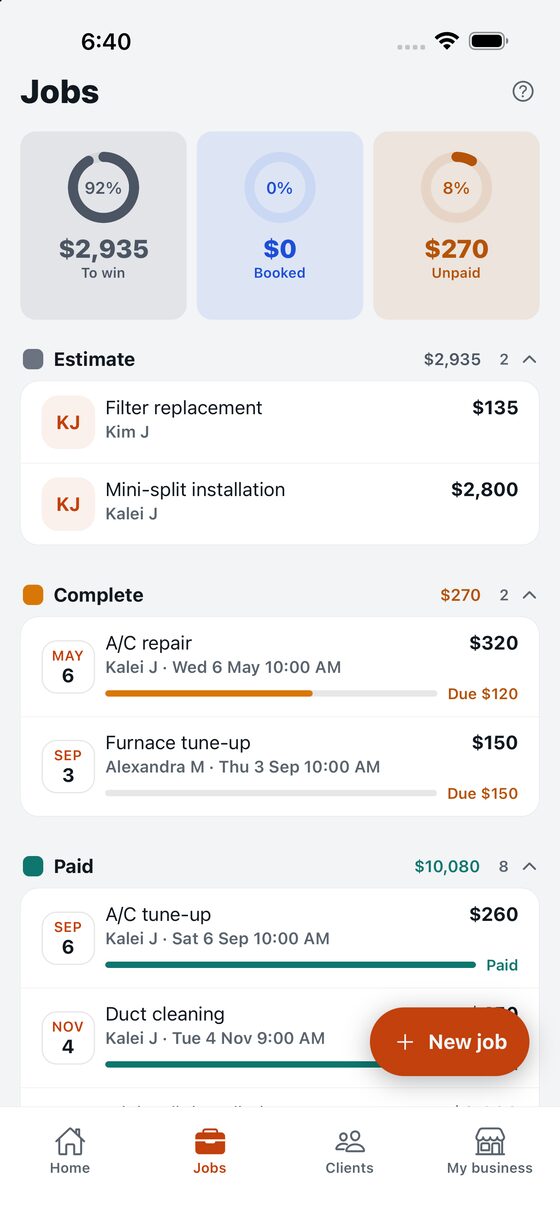
A job goes through four moments, each with its own color. The color tells you at a glance what you need to do.
| Moment | What it means | What you do |
|---|---|---|
| Quoted | You sent the price and they have not answered | Wait, or remind them |
| Working | They said yes; the job is under way | Do it |
| Finished | You did it and still need to collect | Collect |
| Paid | They paid in full | Nothing — closed |
A job does not move on its own. You move it, because you are the one who knows what happened.
I finished the job but I have not been paid
Mark it finished anyway. That is where it belongs: the app adds it to what you are owed and reminds you on the Home screen, with a button to send the reminder.
What if the job falls through?
Cancel it and say why. The app treats two cases differently, and the difference matters:
- If it was only quoted, you lost nothing: that money was never yours. It just drops off what you expected to earn.
- If you had already done it and were not paid, that is a real loss, and the app counts it as one in the month you gave it up.
If they show up later and pay, you can reactivate it: the loss is given back.
💵Money
What is the difference between a deposit, a payment and paying in full?
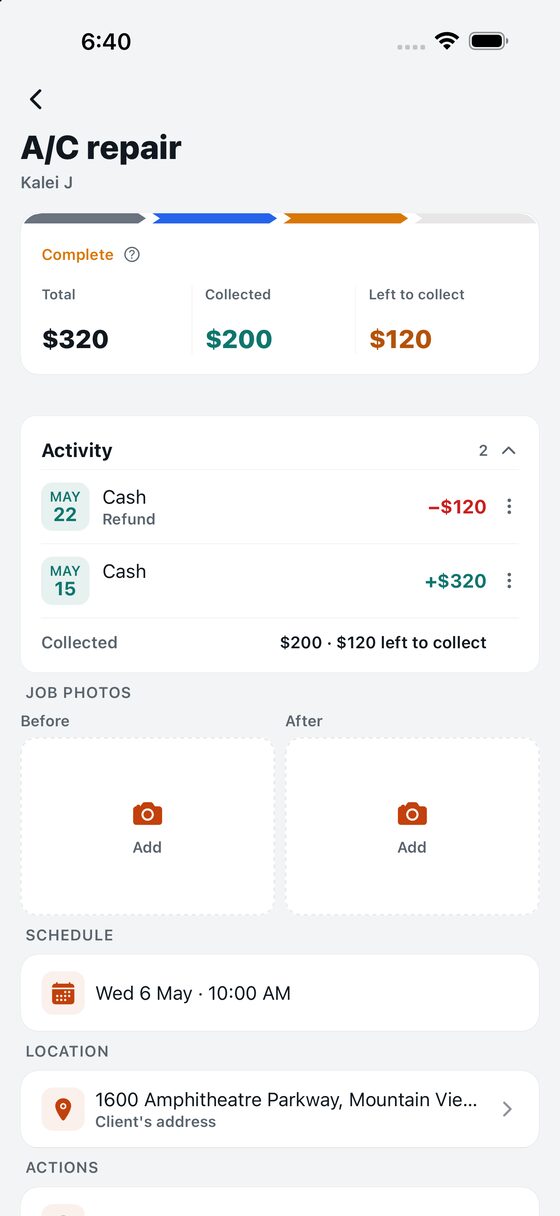
| When… | Log it as |
|---|---|
| They give you money before you start | Deposit |
| They give you part and still owe the rest | Payment |
| They pay everything that was left | Payment in full |
| You give money back to the customer | Refund |
Whatever you call it, what matters is logging the money on the day it actually moved. That date is what the app uses for every calculation.
They paid everything up front — is the job collected?
The money is collected, and it counts from that day. The job is not: it stays open until you do it. They are two different things and the app keeps them apart on purpose — you were paid in advance, but you still owe the work.
They paid me more than the price
Log what they actually handed you, not the price. If the job was $130 and they gave you $150, log $150: $150 went into your pocket and the app has to count it.
Where do I log what I spent on materials?
On the job, under "Log materials". They are kept apart from the customer's money on purpose: what he paid you is one thing, what it cost you is another.
TeAyudo, the assistant
What exactly is TeAyudo?
It is an artificial-intelligence program — the kind that understands what you write and answers back — and the app asks it one very specific question on your behalf. It does not live on your phone: when you call it, your job travels to a computer at Anthropic, the company that builds the program, and the answer comes back in a few seconds.
The app asks it three different questions, and it is worth not mixing them up, because they do not answer the same thing:
| The question | What it hands back |
|---|---|
| What it still needs "can you price this with what I gave you?" | If a detail is missing to get it right, it asks you for it, in plain words, before giving you any number. It is one single question and it does not use up an estimate. |
| The price "what does this go for?" | A fair price, plus a sensible floor and ceiling. This is the one almost everybody uses. |
| The crew "how many people, how many hours?" | How many people to bring, how many hours it takes, what to pay each helper per hour and what that labor costs you. Needs the Payroll plan. |
Why does it ask me something before giving me the price?
Because it can estimate with what you wrote, but the detail that changes the number most is missing. It puts it like this: "I can estimate now, but with one more detail I can give you a much better price".
It is one single question, never a list, and you answer it by looking at the site — nothing to research, nothing to measure. You answer by typing, in your own words.
It is worth answering. Without that detail the price often lands below what the job actually pays: the assistant cannot guess what nobody told it, and when in doubt it comes up short.
There are things it will not ask: anything you already wrote, nor what your customer wants to spend. And if you uploaded a photo, it looks at that first — whatever shows there it will not ask about, so quite often it asks nothing at all.
Where does TeAyudo get the price it suggests?
From your own prices, first and foremost. TeAyudo looks at the services you put on the job and how many, and works out your number: if your tune-up is $130 and you put two, your number is $260.
Then it compares that with what the job actually goes for in the United States, and takes into account what you told it about the site: the size, whether it is an old house, whether debris has to be hauled, the photos you uploaded.
That "what it actually goes for" is not a hunch of its own: for every trade the app hands it the ranges the market works with — what a drain clearing costs, a half-acre mow, an A/C tune-up — and requires its number to rest on them. On top of that it adjusts for your area: the same job is not worth the same in a small town as on the coast.
Out of that comes the suggestion: a fair price and a range of the least and the most you could reasonably charge. Next to the number it tells you why, plus two or three things that push THAT job's price up or down.
What do I have to tell it so it gets it right?
The better you describe the job, the better the number. What moves the needle most, in order:
- The photo of the site. It changes the answer more than anything else: TeAyudo looks at it and works out size, slope, obstacles and real condition on its own. If the photo and the text disagree, the photo wins.
- The quantity. Eight windows is not one window. If you enter the service with its quantity, the number comes from the whole job and not from a single unit.
- The size or the conditions of the site — half an acre, two storeys, a sloped yard, debris everywhere.
- Your ZIP code, which comes straight from the customer's address and is what tunes the price to your area.
What if it gets it wrong and suggests a ridiculous price?
A ridiculous price will not reach you. Before showing you any number, the app checks that it makes sense against your prices and against what that job costs in your trade.
- If the number is out of bounds, the app asks again, this time a more careful assistant.
- If it is still off, the app caps it and shows you the closest number that does make sense.
- And every trade has its own ceiling: a full roof can run into the thousands; a cleaning cannot.
And the other way round, too. If TeAyudo suggests quite a bit more than you have set, it has not made a mistake: that job is being paid more than you charge. The app only lets that number through when it matches what the job goes for in the market — if it does not, it gets capped all the same.
But that catches the ridiculous ones, not the small misses. A number ten times too high never gets out; one that falls twenty percent short does. TeAyudo is a program that estimates, and estimating goes wrong sometimes: it can come up short on an unusual job, or run high if your notes say the customer pays well. That is why the price sheet says so at the bottom — "this is an estimate and TeAyudo can get it wrong" — and why the number it suggests is never saved anywhere on its own.
How does it work out how many people and how many hours?
From the same thing: the job you are going to do and how big it is. It tells you how many people it takes, how many hours it runs, and what you would have to pay each of them per hour for the job to still pay off.
The hourly pay it suggests is what a helper gets paid in your trade and your area — not a licensed technician's rate, and not what YOU charge the customer either. Those are three different numbers, and mixing them up is the fastest way to work for free.
And if you already priced the job, it does the whole arithmetic and tells you what you keep:
| Out of what you charge… | How much |
|---|---|
| What you pay the helpers | Hours × hourly pay × how many (you do not count: you do not pay yourself) |
| Gas, equipment and wear | An estimate of about a tenth of the price |
| Taxes | An estimate of about a fifth of what is left |
| What is left for you | All of the rest. It is not split among the workers: you already paid them |
If that arithmetic leaves you less than two workers' pay, TeAyudo warns you and suggests raising the price, with the figures in plain sight so you can see where they come from.
How many times can I ask it?
On the free plan you get a few to try it out, and they do not renew: they are there so you can see whether it helps. On a paid plan you get an allowance every month, and on the Payroll plan more still. You see the exact number on the Plans screen inside the app.
The month is counted on your calendar, in your own time zone, not a server's on the other side of the world. And if the query fails, it is not deducted.
Does TeAyudo see my customers' data?
No. Nothing of your customer goes out — not the name, not the phone, not the email, not the street address. The only location detail that travels is the ZIP code and the state, which is what it takes to know whether you are in an expensive area or a cheap one.
What does travel is the job itself: the title, what you wrote, the services with their quantities and prices, and the photo of the site if you uploaded one.
📊Your numbers
What is the Home screen telling me?
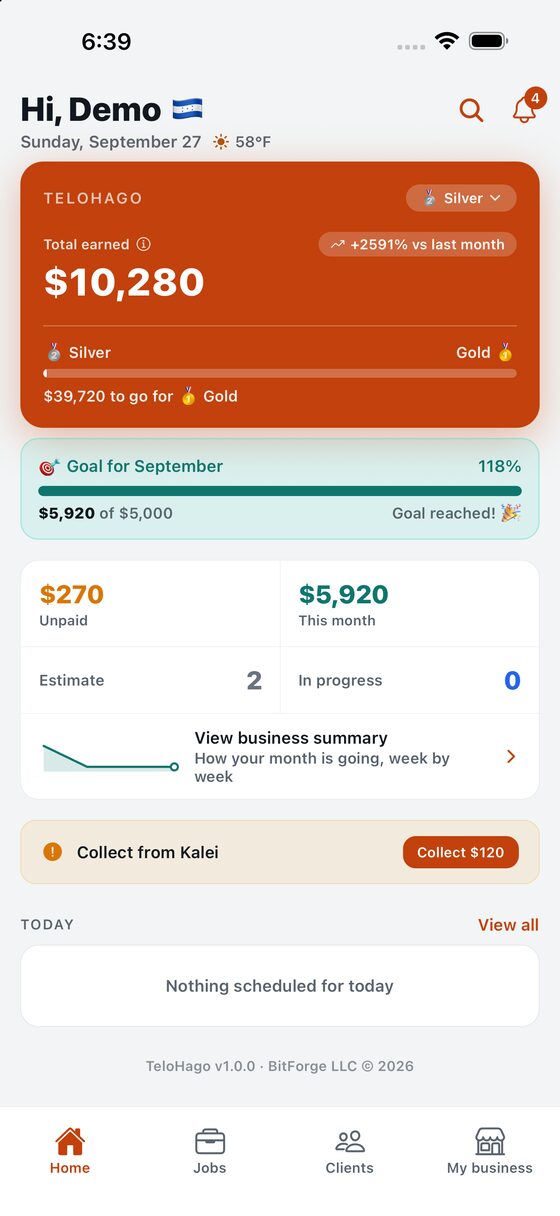
| What you see | What it is |
|---|---|
| Total earned | Everything you have collected since you started |
| Your tier | A badge that goes up with what you have earned |
| Monthly goal | How far along you are on what you set out to do |
| Unpaid | What you are owed right now |
| This month | What has come in this month |
The colors are not decoration: money in is teal and money out is red. What is still owed is amber. It works the same everywhere in the app.
What is the business summary for?
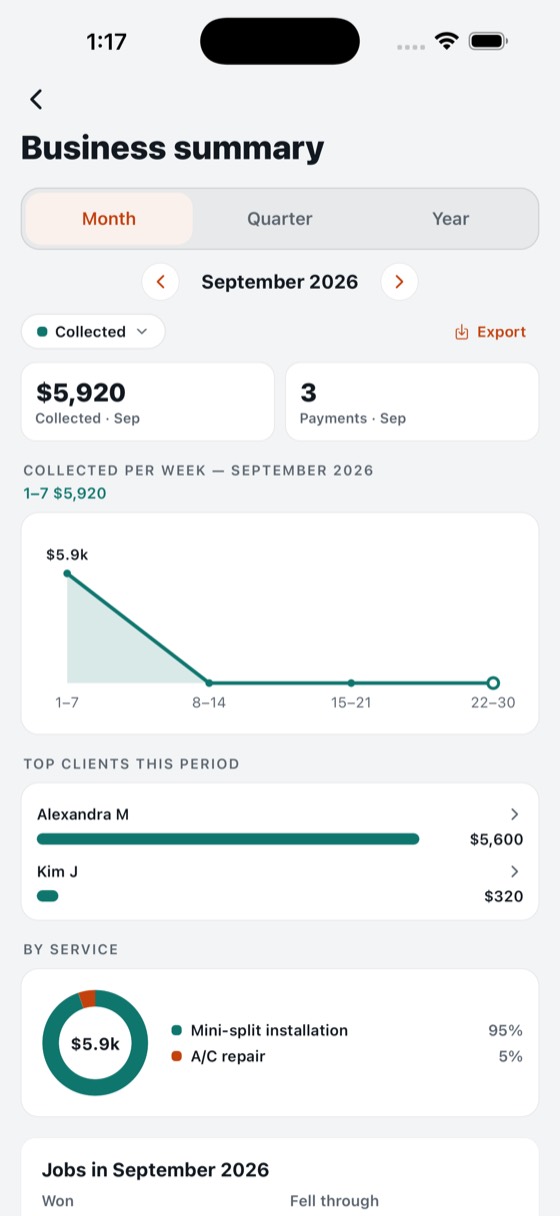
To look at your month, quarter or year from six different angles. You pick them at the top:
| Angle | Answers |
|---|---|
| To win | How much is sitting in quotes waiting for an answer? |
| Booked | How much is the work I said yes to and have not done? |
| Unpaid | How much am I owed? |
| Collected | How much came in? |
| Profit | What was left after materials and paying my crew? |
| Lost | How much fell through? |
What is the proof of income?
A PDF that shows how much you have earned, month by month over the past year. It is for a landlord, a bank or whoever does your taxes — they often ask a self-employed person for something that proves their income.
It comes from what you logged, so it is worth what your records are worth: if you log everything, the document tells the truth.
👷Your crew
How do I add someone who works with me?
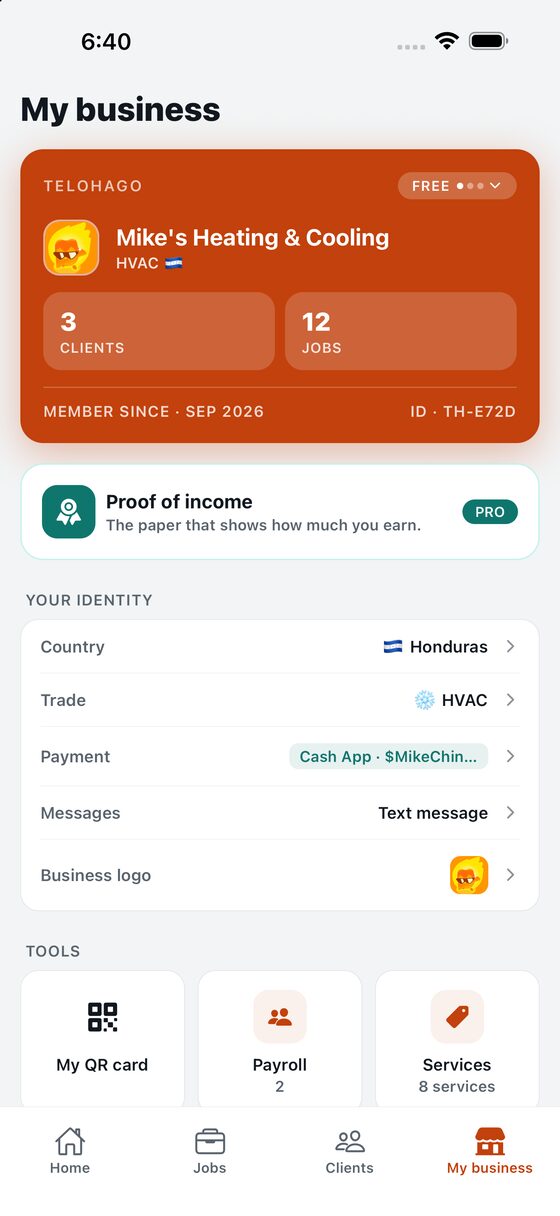
Under "My business → Payroll". You enter their name, phone and which language they want their messages in — the work order reaches them in theirs, not yours.
How do I pay them and where is it logged?
From their page, or from the job they worked on. There are two kinds, and the difference is only when:
- Payment: you pay them for work done.
- Advance: you front them money beforehand.
Both are money that left your pocket that day, so both reduce your profit for the month. What they do not do is reduce what you collected: that already came in.
Can I give them a proof of income too?
Yes. On their page, "Proof of income for them". It is the same document as yours but with what you have paid them, so they can prove their income when asked.
💬Messages to your customers
How do I send the quote or the reminder?
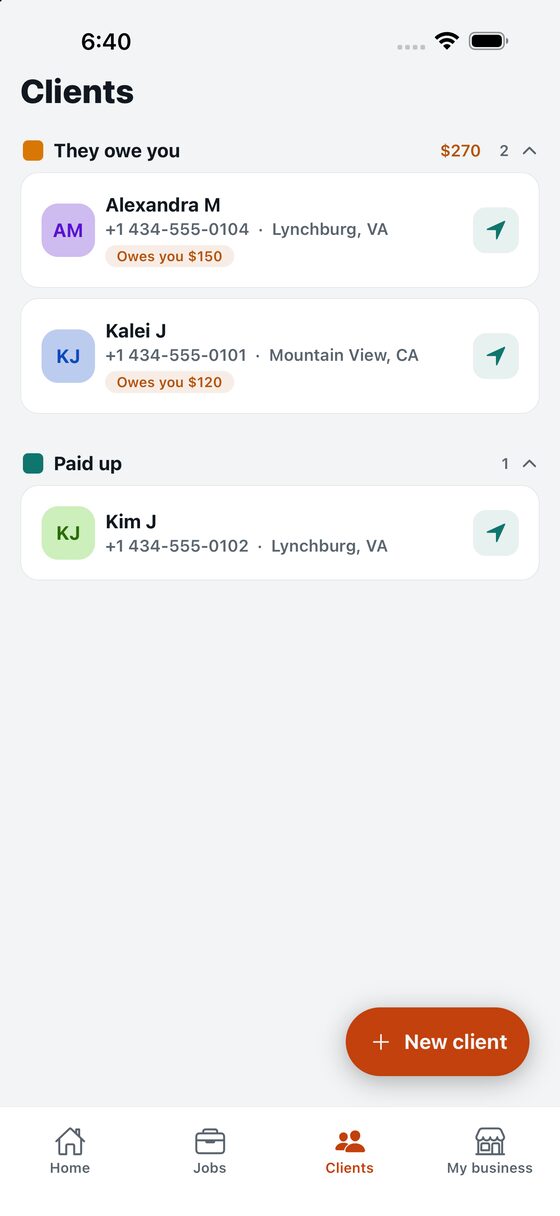
From the job. The app writes the message with the customer's name, what you are going to do and the amount; you read it, change it if you want and send it.
You can send it by text, WhatsApp or email. Under "My business → Messages" you choose which comes up first; the others are always still there.
My app is in English — is the message too?
No: the message goes out in the customer's language, the one you set when you created them. Your app can be in English and Mrs. Michelle still gets her quote in Spanish.
💳Plans
What does each plan give me?
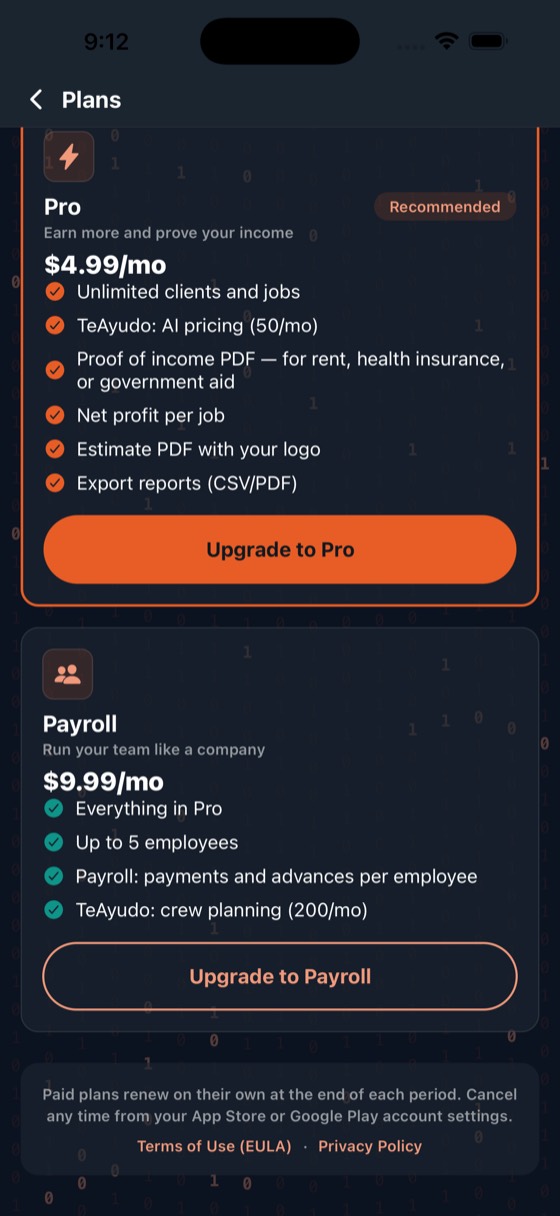
| Free | Pro | Payroll | |
|---|---|---|---|
| Customers | 15 | As many as you want | As many as you want |
| Jobs per month | 20 | As many as you want | As many as you want |
| Quote, collect and track it all | Yes | Yes | Yes |
| TeAyudo prices | 3 to try it | Every month | Every month, more |
| Proof of income | No | Yes | Yes |
| Quote PDF with your logo | No | Yes | Yes |
| Your profit per job | No | Yes | Yes |
| Export your numbers to CSV or PDF | No | Yes | Yes |
| Employees and their payroll | No | No | Yes |
Throughout this help you will see a 🔒 on the sections that cover something you have to pay for, and it says which plan. That way you do not find out at the end.
How far do I get without paying?
Quite far, and on purpose. For free you can genuinely run your business: log customers, build jobs, collect in parts, send the messages and see what you have earned. It is not a seven-day trial and it does not ask for a card.
What is capped is the volume — 15 customers and 20 jobs a month — and the handful of things that cost money every time they run. If you hit that cap it is because business is going well, and by then the app pays for itself.
Why does it cost anything?
Because TeloHago does not live alone on your phone. Underneath it uses paid services, and several of them charge every single time they run:
| When you… | This is what happens underneath |
|---|---|
| Ask TeAyudo for a price | An artificial-intelligence model from Anthropic is queried, and it is billed per query. If you sent photos it costs more still: looking at an image costs a good deal more than reading a line of text. It is the most expensive thing in the whole app. |
| Ask it for the crew calculation | That is a second query to the model, separate from the price one: it is asked about people, hours and pay, not about price. It is billed separately. |
| Name a service or a job | It is translated into the other language on its own, with the same model, so the message reaches your customer in theirs. It is cheap, but it is still billed — and it does not use up any of your allowance. |
| Type a customer address | Every address lookup is billed. |
| Save anything at all | There is a database running 24 hours a day, with backups. |
| Upload a job photo | It goes into private storage that is billed by space. |
| Download the app or an update | The store keeps its share of every subscription, and the developer program is paid yearly. |
That is why the free plan gives you three TeAyudo prices and not three hundred: each one costs real money. What you pay is not to "unlock" something that was already there — it is what keeps running the things you use.
Who makes TeloHago?
A Honduran engineer living in the United States, with more than fifteen years building software for companies. TeloHago is published under BitForge LLC, his company, registered in Virginia.
It is not a big company with a call center. It is one person who knows the craft of building software, who made this app for people who know theirs: the ones working for themselves — fixing, cleaning, installing, mowing — who get to the end of the month unsure what they actually made.
That is why the whole app is in both languages, and why the message reaches your customer in theirs. It was not a feature added later: it is where the idea came from.
How do I cancel, and what happens to my data?
You cancel it where you cancel every subscription: in your store account settings, not inside the app. We cannot charge you again on our own.
You keep the plan until the period you already paid for runs out. After that the app goes back to the free plan.
🛟If something is off
Does it work without internet?
For looking, yes — what already loaded stays. For saving, no: with no signal the app tells you it did not save. If you see no warning, it saved.
A number does not add up
It is almost always a date. The app counts each movement on the day it happened, not the day you typed it: if on Tuesday you log a payment from Saturday, it counts on Saturday. Open the job and check the dates.
If it still does not add up, write to us with the screen and the number you expected. That is exactly what we need to fix it.
The app looks light or dark and I did not set it that way
Under "My business", next to the language, there is Appearance, with three options: Automatic, Light and Dark. It ships on Automatic, which follows your phone: if your phone goes dark at night, so does the app. If you would rather it never changed, pick Light or Dark and it stays there.
The Plans screen is always dark, under all three options. That is not a bug: it is built that way on purpose.
How do I delete my account?
Under "My business", at the very bottom. It asks you to type a word to confirm, because everything goes: customers, jobs and the money history. It cannot be undone.